
See a customer's full ticket history on their profile
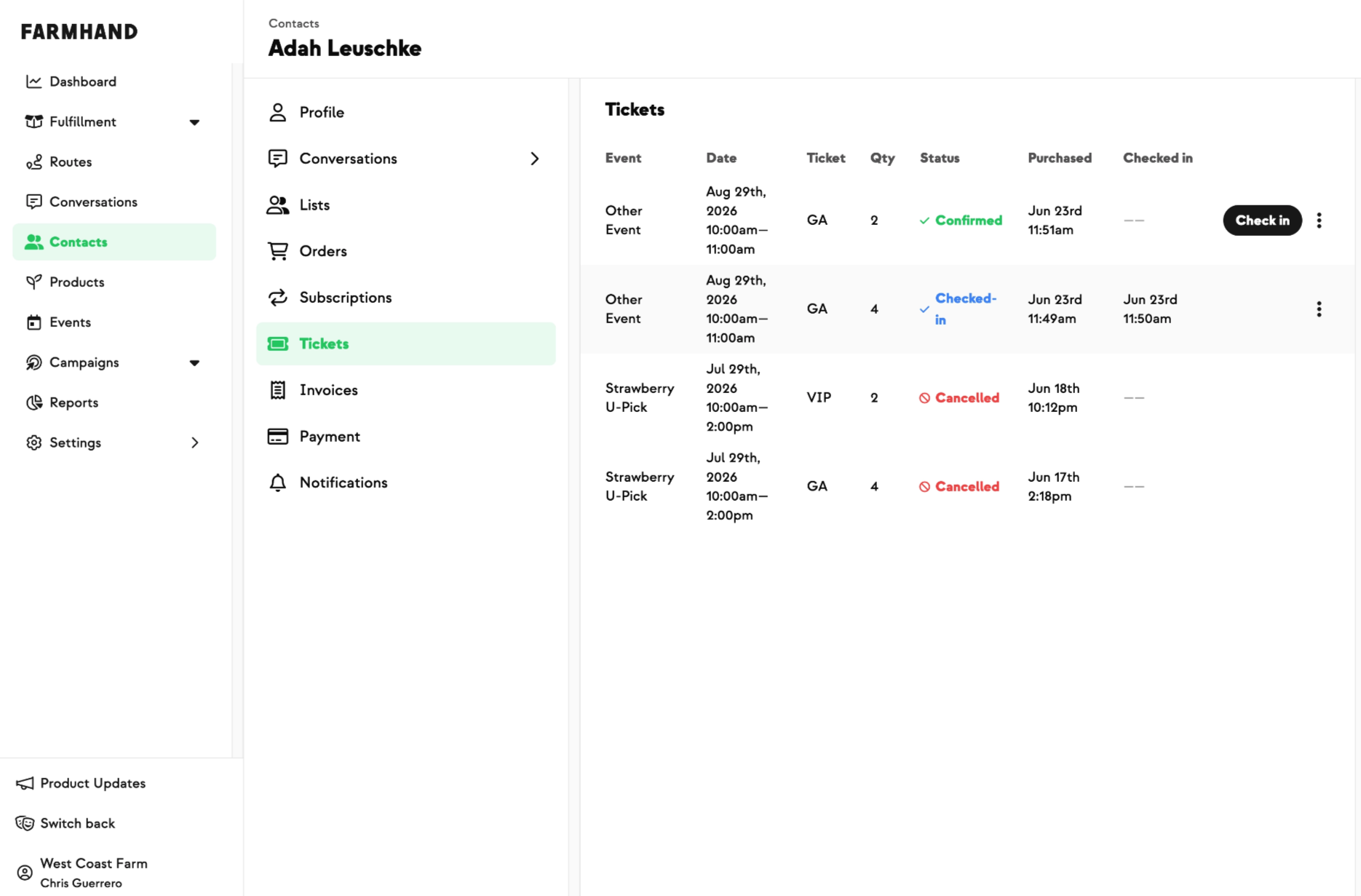
Tracking down which events a customer had tickets for used to mean opening each event one at a time, going to its Registrations page, and searching by name. Now the Customer details page has a Tickets tab that shows that customer's complete event history for your farm — upcoming and past, most recent first — for anyone with an account. Each row lays out the event, date and time, ticket type, quantity, status, when they purchased, and whether they've been checked in. And you can act right from the tab, just like on the event's Registrations page: check a customer in, undo a check-in, or cancel a registration (cancelling runs the usual refund or credit). It's one per-customer view of all their event activity — no more hopping between events to find what someone bought.
Built With Farmers. Not For.

Curtis Millsap
New on Farmhand




Your farm is growing.
Your platform should keep up.
Our roadmap is built from farmer conversations, not corporate planning cycles. You ask. We build. You see it live.