
Handle skip requests that come in after the cutoff
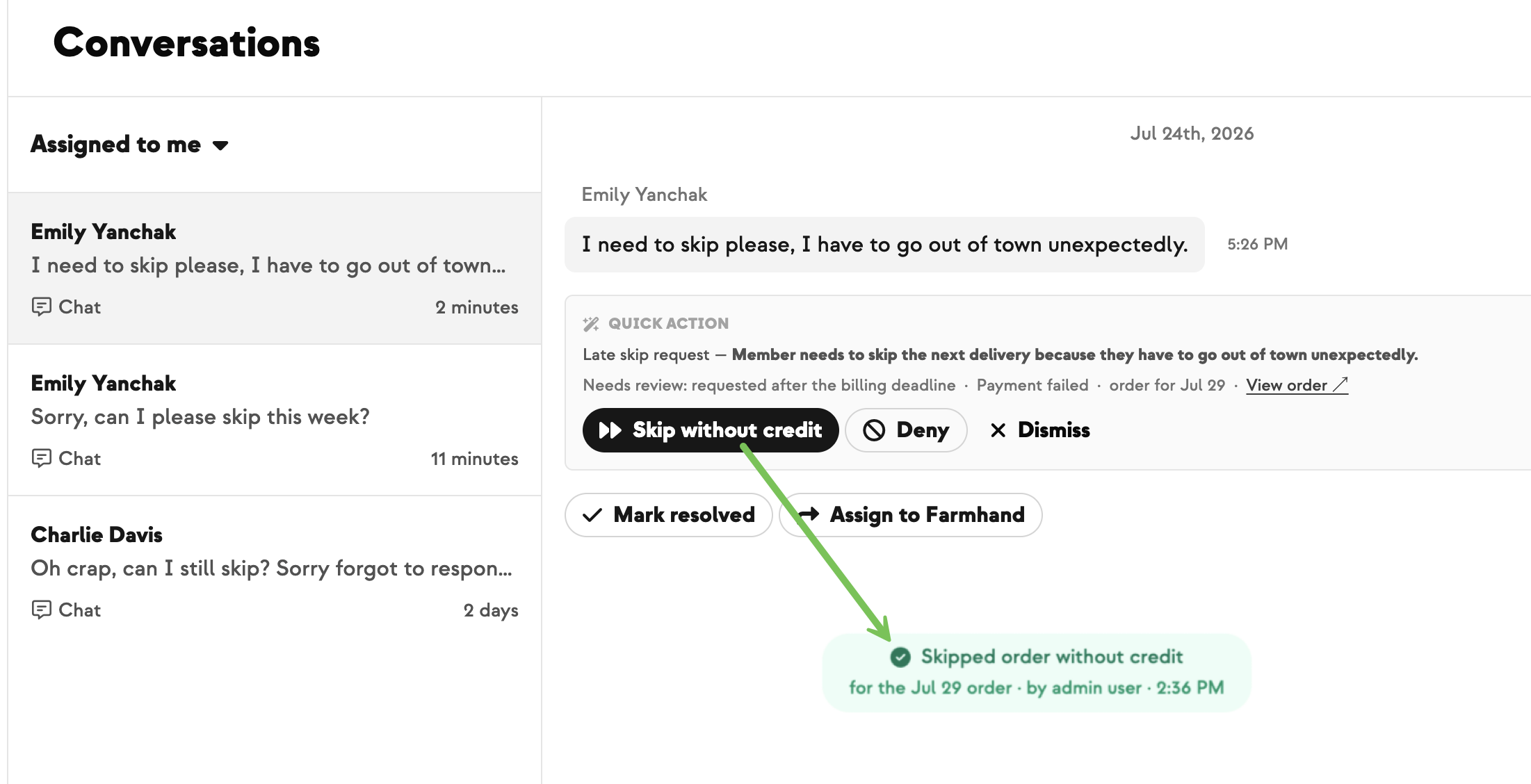
A member emails Tuesday night asking to skip Wednesday's box. The cutoff passed hours ago. Until now that request hit a dead end — someone had to dig up the order, sort out the billing, and check with you before anything could happen.
Now it's handled for you when the billing deadline hasn't passed yet and your skip policy allows it. The member gets a confirmation right away — account credit if they already paid, a canceled invoice if they hadn't — so they're never billed for a box they skipped.
Everything else comes to you. If the billing deadline has passed, your farm doesn't allow customer skips, or the payment situation isn't clear, the request lands in your conversations with three buttons: Skip & credit, Skip without credit, or Deny. You make the call and stay the one replying to your member.
Your team can also skip these orders directly from the order page — the Skip this order button now works in that post-cutoff window instead of being grayed out.
Built With Farmers. Not For.

Katie McDowell
Built with Katie at Armagh Creamery, who kept fielding skip requests after the cutoff and needed a clean way to say yes — or no.
New on Farmhand


Your farm is growing.
Your platform should keep up.
Our roadmap is built from farmer conversations, not corporate planning cycles. You ask. We build. You see it live.